


Comet: AI Browser & Assistant
4.4878.00 Reviews
App Specs
- Version
- 1.11.2
- Updated On
- License
- Free
- Downloads
- 1,000,000+
- Developer
- PerplexityAI
- Categories
- Communication
- Platform
- Android
Screenshots


 Analysis by AppCompare
I find that the most useful way to judge a mobile browser is not by how ambitious its pitch sounds, but by what happens when I’m trying to get something done quickly. Comet: AI Browser & Assistant combines web browsing with an AI assistant, so the main question is whether that extra layer helps with everyday tasks or simply gives me another thing to manage. My take is that it’s most appealing to people who want to ask questions while browsing, but it still needs the same basic setup and troubleshooting patience as any new browser.
Where the first snags tend to appear
Switching browsers can feel less seamless than installing an app. You may have familiar habits built around another browser, and a new layout can slow you down before it saves time. I’d start by using Comet for a few low-stakes searches rather than immediately making it the default for every link. That gives you a chance to learn where the address bar, tabs, and assistant fit into your routine without disrupting a task you need to finish.
The assistant also benefits from a clear request. A broad prompt can produce an answer that is technically related but not useful for your actual decision. I get better results when I name the goal and the constraints: for example, ask for a short comparison of two options and say what matters most to you. Then check important details on the original page. An AI response can help you orient yourself, but it should not replace reading the source when accuracy matters.
Simple checks before blaming the browser
If a page fails to load or a feature behaves oddly, I’d first check the basics: confirm the phone has a working connection, try the page again, and make sure the app is current. Comet is listed as version 1.11.2 and requires Android 12 or later, so an older Android device is not a good fit. Keeping the app updated is a sensible first step when troubleshooting, though it cannot fix a weak network or a problem with the site itself.
I’d also separate a browser issue from an account or page issue. If one site is the only thing acting up, retry it later or open another page to see whether the problem is broader. If the assistant gives an answer that misses your point, rephrase the question with more context rather than repeatedly sending the same vague prompt. These are small checks, but they can save time and prevent an ordinary connection hiccup from turning into a reason to abandon the app.
Using Comet in a real browsing routine
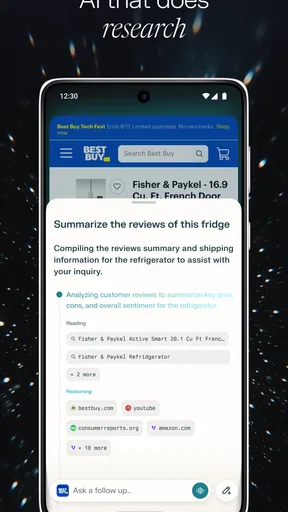
For me, the clearest use case is research that begins with a question and quickly leads to several pages. I might be comparing a product, looking up a travel detail, or trying to understand a term in an article. A browser with an assistant can reduce the back-and-forth between searching and asking, but it does not remove the need to judge sources. I’d use the assistant to get oriented, then visit the pages behind the answer before acting on it.
Recovering a workflow when something goes wrong
If a page or session gets interrupted, I’d keep the recovery simple: return to the page, check the connection, and repeat the search in a more focused form if needed. For a multi-step task, it helps to keep a short note of the names, dates, or options you have already found instead of relying on memory or expecting an assistant to preserve every detail. That habit is useful in any browser, and especially when a task moves between a web page and a conversational answer.
Worth Reading Before You Choose

EA SPORTS FC Mobile 26 Is a Bigger Football Game, but It Takes Time

Flipboard Shows What News Apps Must Do Beyond the Feed

Switching to Android Auto Means Rethinking Your Driving Routine

Google Calendar Makes a Crowded Week Easier to Manage

Ludo King Makes the Most of the Minutes Between Plans

Baby Panda World Brings Quick Play to Modern Phones, but Its Game Library Feels Busy
When an answer seems incomplete, ask a narrower follow-up rather than assuming the first reply covered every angle. For example, separate “what are the choices?” from “what should I check before choosing?” This makes the exchange easier to evaluate and exposes gaps. I still verify consequential information against the relevant page, because a fluent summary is not proof that every detail is current or complete.
When a different browser may suit you better
Comet is not automatically the right replacement for a browser you already like. If your priority is a familiar, lightweight way to open pages and you rarely want an AI response, the assistant may add little to your day. A conventional browser can be a better choice when its established setup and habits matter more than asking questions in the middle of research. Likewise, if you need a particular browser workflow, test it before moving all your browsing over.
It is also worth remembering that AI convenience comes with a judgment call: you are choosing to bring generated answers into a task where ordinary search results might be enough. I would not use an assistant response as the final authority for health, money, legal, or time-sensitive decisions. In those situations, use it only as a starting point and consult the primary source or a qualified person. That limitation is not unique to Comet, but it matters when deciding whether an AI-centered browser belongs in your everyday routine.
Who is likely to get the most from it?
I’d point Comet toward curious readers who regularly follow a search with questions, compare information across pages, or want an assistant close at hand while browsing. It may also suit someone willing to spend a little time learning a new interface in exchange for trying a more conversational research flow. If you mostly open a handful of saved sites and want nothing beyond straightforward browsing, you may not notice enough benefit to justify changing your habits.
For a realistic example, imagine you are planning a weekend outing and are checking a place, its opening details, and nearby alternatives. You can use a search to find the relevant pages, ask the assistant to help organize what you are looking for, and then verify practical details on the sources themselves before leaving. The useful part is the transition from question to research; the trade-off is that you remain responsible for checking whether the answer matches the latest information.
What the app costs and who can install it
Comet is a free communication app from PerplexityAI, with optional in-app purchases priced from $19.99 to $199.99 per item. I would try the free app before considering any purchase, then decide whether its assistant-led browsing is valuable enough for my own routine. Those purchase prices make it especially sensible to understand what you actually use before spending; a browser is only worth paying for if its specific tools earn a regular place in your day.
The app is rated for Everyone, has a 4.4 average from around 32,000 ratings, and has been installed over a million times. It was released on November 19, 2025. Those figures suggest that it has attracted a substantial audience, but they don’t tell me whether its approach will suit your habits. I’d treat them as context, not a substitute for trying a few searches and deciding whether the assistant makes browsing clearer or more distracting.
My practical verdict
My recommendation is to test Comet alongside your usual browser rather than treating installation as a commitment. Use it for a real question that involves more than one page, notice whether the assistant saves effort, and check how comfortably you can return to ordinary browsing. That small trial answers the most useful question: not whether AI in a browser sounds appealing, but whether it improves the kinds of searches you actually do.
I would skip it if you want a browser with no learning curve, have a device below Android 12, or rarely need help interpreting what you find online. For readers who enjoy asking follow-up questions while exploring the web, it is a promising option with a distinct purpose. The best results come from treating the assistant as a research companion rather than an unquestionable source.
First Impressions
Right out of the gate, Comet: AI Browser & Assistant makes a strong impression with its sleek, minimalist design. It doesn't overwhelm you with options, which is a breath of fresh air in the cluttered world of mobile apps. Navigating through Comet feels intuitive, and the interface is as smooth as butter.
Browsing with a Brain
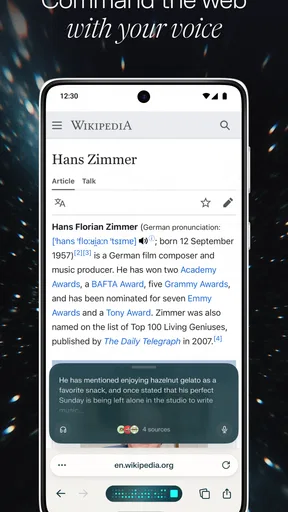
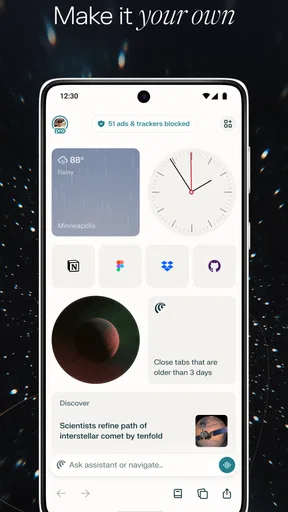
The standout feature here is the AI integration. Comet doesn’t just let you browse; it learns from you. The more you use it, the better it gets at predicting what you might need next. Whether it’s pulling up your favorite sites or suggesting content based on your interests, Comet adds a layer of intelligence that feels genuinely helpful.
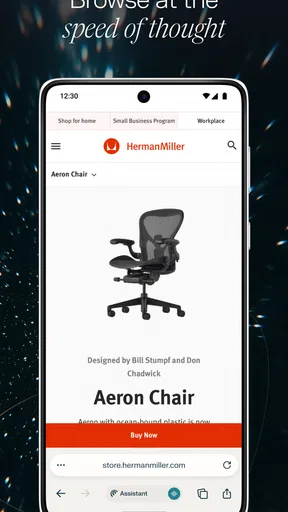
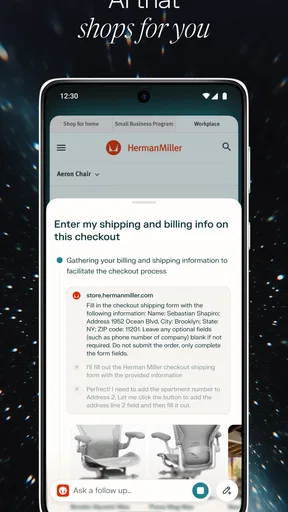
The AI assistant is seamlessly integrated, popping up when you need it without being intrusive. It can handle everything from setting reminders to answering random questions on the fly. It’s like having a pocket-sized assistant ready to lend a hand whenever you need it.
Features That Shine
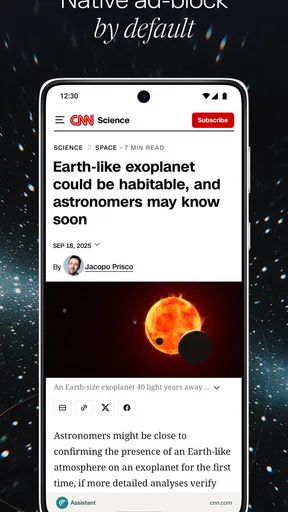
Comet isn’t just about the AI. It packs a punch with several other features that enhance your browsing experience. One of my favorites is the built-in ad blocker. Say goodbye to those pesky pop-ups that always seem to appear at the worst times.
Another feature worth mentioning is the night mode. It’s easy on the eyes, especially during those late-night browsing sessions. Plus, the data saver mode is a lifesaver for anyone dealing with limited data plans. It compresses data efficiently, ensuring you don’t blow through your monthly limit.
Customization and Control
For those who like to tweak their apps, Comet offers a decent level of customization. You can adjust settings to suit your browsing style, whether you prefer a more streamlined experience or want to dive deep into the options available.
The app also respects your privacy. With various settings to control what data is shared, you can browse with peace of mind knowing that Comet is designed to keep your information secure.
Performance and Speed
Speed is the name of the game when it comes to mobile browsers, and Comet doesn’t disappoint. Pages load quickly, and the app handles multiple tabs without a hitch. Even with the AI features running in the background, performance remains snappy and reliable.
Room for Improvement
Like any app, Comet isn’t perfect. While I love many of its features, there are a few areas where it could improve. The AI assistant, while helpful, sometimes misses the mark with suggestions that don’t quite fit my preferences. It's not a dealbreaker, but there's room for the AI to become even more intuitive over time.
Additionally, while the app is generally stable, I did encounter a couple of minor bugs. These were infrequent and nothing that a quick update couldn’t fix, but they’re worth noting for potential users.
Final Thoughts
Overall, Comet: AI Browser & Assistant is a refreshing take on the mobile browsing experience. Its blend of AI-powered assistance and robust features makes it a standout choice for those looking to elevate their web surfing game. While it’s not without its quirks, the pros far outweigh the cons.
If you’re on the hunt for a smart, efficient, and stylish browser, Comet is definitely worth checking out. With its impressive performance and thoughtful features, it could soon become your go-to app for all things internet. Give it a shot and see how it changes the way you browse!
Pros
- Intuitive user interface for seamless navigation.
- Fast browsing with minimal load times.
- Built-in AI assistant enhances productivity.
- Customizable settings for personalized experience.
- Supports multiple languages for wider accessibility.
Cons
- Limited offline functionality.
- Occasional AI assistant inaccuracies.
- Some features locked behind premium.
- Notifications can be overwhelming.
- Requires stable internet connection.
FAQs for Comet: AI Browser & Assistant
What is Comet: AI Browser & Assistant and how does it work?
Comet: AI Browser & Assistant is an innovative app designed to enhance your web browsing experience using artificial intelligence. It integrates an AI assistant that helps you with tasks like searching, organizing information, and managing tabs efficiently. The AI learns from your habits to offer personalized suggestions, making your browsing seamless and intuitive.
Is Comet available for both Android and iOS devices?
Yes, Comet: AI Browser & Assistant is available for download on both Android and iOS platforms. This ensures that regardless of your device preference, you can enjoy the features and benefits of Comet. Simply visit the Google Play Store or Apple App Store to download and install the app on your smartphone or tablet.
What are the key features of Comet: AI Browser & Assistant?
Comet offers a range of features including AI-driven browsing, a built-in AI assistant for task management, enhanced privacy options, and customizable user interfaces. Additionally, it supports multiple tabs, voice commands, and provides smart recommendations based on your browsing history, making it a comprehensive tool for modern users.
How does Comet ensure user privacy and data security?
Comet prioritizes user privacy and data security by implementing robust encryption protocols and privacy-focused features. The app does not store personal data on external servers, and users have the option to browse in incognito mode, ensuring that their browsing activities remain private and secure at all times.
Are there any subscription fees or in-app purchases in Comet?
Comet: AI Browser & Assistant offers a free version with essential features. However, to unlock advanced functionalities and an ad-free experience, users can opt for a premium subscription. This model allows users to choose the level of service that best fits their needs, ensuring a flexible and cost-effective browsing experience.


